- cross-posted to:
- programmer_humor@programming.dev
- cross-posted to:
- programmer_humor@programming.dev
You must log in or # to comment.
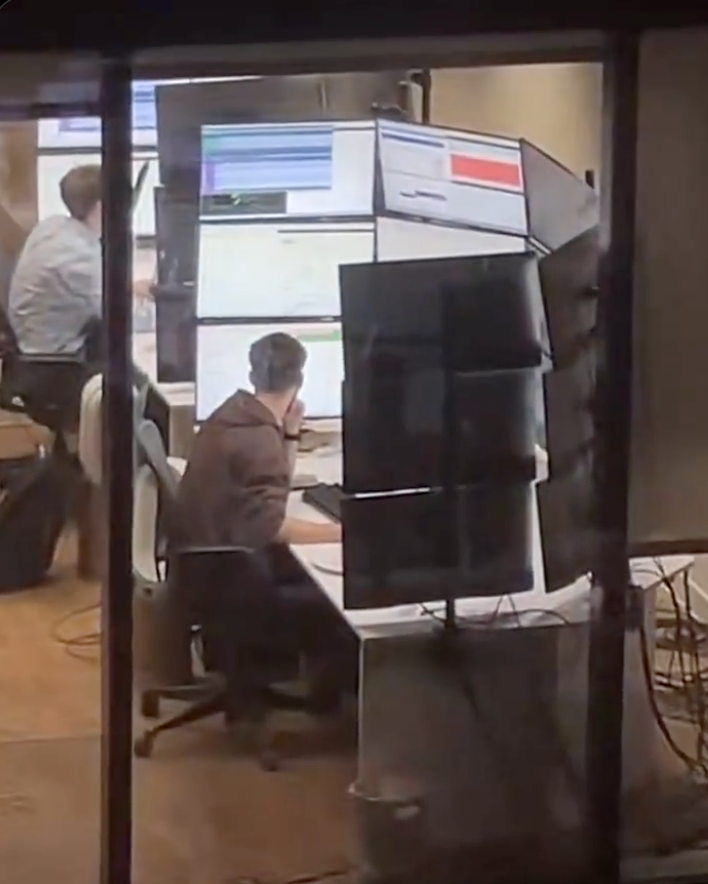
I work at a stock brokerage and I can confirm this is exactly the screen layouts these people have. By these people I’m talking about day traders I don’t actually know what this person is doing.
And yes they do look across all of those screens. I sat next to a guy who had six screens arranged in 3x2, the way he explained it he has all sorts of programs mostly in the domains of communication and news and he doesn’t even look at the other screens but when something moves it triggers his peripheral vision and he acts on it. Another day trader I know has nine screens in 3x3 but he only uses the bottom half of his screen real estate because he can’t read the top, he just likes having a big rectangular-like screen.
It’s all about peripheral vision to these kinds of professionals. They are 100% not looking at all of those screens, they just need to set up things to react to.
This guy is a meme though nobody is reacting to something happening right above your head.
On KDE Plasma when you shake the cursor it gets bigger, with no size limit.
On macOS it also does but there is a limit.
I don’t know whether Windows does because I’ve never used it, but I’d assume so.
Neither do I know about other DEs.
For those interested, there is a gnome extension called Wiggly that does this a similar thing.
Used to be called Wiggle, but development and bug fixing seems to have stopped on that one.
I think you can enable something where you can press control and it will put a big circle around your cursor but it’s not enabled by default which is stupid and it’s not obvious because it’s a random keyboard key.
It’s a utility under PowerToys called Find My Mouse.
You can set it to either double pressing the left or right Control key, shake the cursor or a custom shortcut.
This has been a godsend for me…I have a pair of 35" ultrawides and I was constantly losing the mouse due to the fact that my desktop is 70" wide lmao
Windows doesn’t. I lose my cursor all the time even though I made it neon green.
I’ve known people who have had the same issue and they not only turn it neon green but trunk on mouse trails to an extreme degree. If you draw a little circle with your hand it’s very easy to spot.
I’ll have to give that a shot at work
Doesn’t Windows have the option to configure a hotkey to indicate cursor location? Maybe in the accessibility settings or something? It’s been a while since I’ve used Windows.
Yeah double tap control
I was about to say this same thing. It’s such a fantastic feature.
Sometime I get bored and wiggle the mouse untill it covers both screens. 10/10
Hivemind. Came here to say this. I lose so much time shaking that damn thing.
This is it. This is the threshold of where a VR headset and a virtual desktop manager makes more sense.
I can’t believe no one’s posted this yet

As much as I’m an advocate for VR I don’t think I’d want to spend 8 hours in a rig. I look like I’ve been wearing ski goggles as it is and that’s only after two or three hours.
Props for even being able to be in for 2 or 3 hours.
I get this uncanny valley feeling after only an hour. If the motion sickness doesn’t get me first.
I think I’d still rather this than have a heavy device on my head, an umbilical, and motion sickness.
I think I’d still rather this than have a heavy device on my head,
I’ve wondered about this, actually. We’d need necks like an NFL linebacker.
an umbilical, and motion sickness.
Joking aside, that’s a legit concern. It’s not for everyone, that’s for sure.
What extreme office activities are you doing that you would suffer from motion sickness?
I am saying VR will give me motion sickness.
Having 35 monitors won’t
Maybe that would be a better screen setup?

I refuse to believe that this setup is actually efficient. You cannot possibly actually need that much information on screen at the same time. I think Houston mission control has less going on than this.
This is just having a lot of screens for the sake of it.
keeps him warm ?
He uses them to work on his code and his tan.

This guys been waiting for his moment
A least he’s getting enough light. Maybe not the right wavelength though.
I was going to say his vitamin D intake is at least taken care of.
If I had that many screens I would at least put everything in dark mode.
If I had that many screens I would at least put everything in dark mode
Oh my god, right? That shit’s gotta put you in “All work and no play make Jack a dull boy” mode toute suite lmao
Those little monitor bracket clamps vs the edge of that desk…
Somone needs to make a program that greys out any monitor that the cursor isn’t on.
That’s actually a solid suggestion. I might not want it when I’m using another monitor to play a video/music/etc while multitasking, but a keybind to highlight the right monitor and ping the cursor would be useful. I think windows had a cursor ping ages ago, but I wasn’t in my 40s then and only had one screen, so never used it. As I age, I need three monitors now to have my activity, the support docs, and the requirements all visible and losing my fucking cursor is the thing that makes me curse the most. [throw it all the way to the top left corner is my workaround, but it sucks]
I have had friends and coworkers send this meme to me repeatedly because my WFH setup is closer to this than I’d like to admit. Fuck it though, I find it helpful.
Bro, I have one coworker that does his work on a 14" laptop, no external mouse or keyboard.
I have no idea how. I have minimum 15 windows open at once and am going back and forth on them or have 4 windows open at once in my monitors to compare data and make markups. And ofc a nice keyboard and mouse. Laptop gets shoved out of sight.
I feel like he’s either really slow or not doing any work at all.
And then I feel guilty because I don’t work hard enough 🙄
I did this. works fine for me because I am efficient with virtual desktops.
The answer is he is really slow.
I have that same coworker.
He’s the true definition of a grinder. Works on a laptop screen with only touchpad. He works 7 days/week and 9 hours/day to keep up productivity. I have no idea why.
I told Mgmt to please for the love of God buy him a monitor, and a mouse. My coworker refused both…
Yeah makes me feel like I’m so efficient I don’t need to work near as much as I do!! But honestly my job is pretty easy, I’m under utilized and while its boring, its not bad and I get paid enough.
his background image:

I just saw a windows 95 era gradient until i zoomed in
Whoa, slow down there Satan.
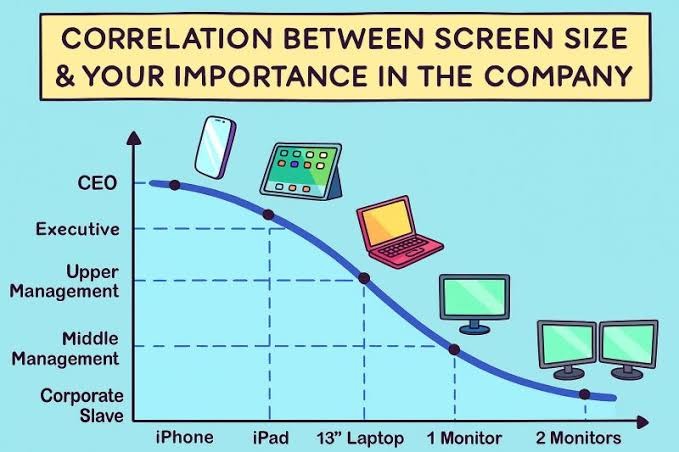 I guess we need to extend this chart somewhat…
Those executive ultrabook, touch screen super thin and lites are such shit. Fragile, usually run hot, sometimes the SSD is even soldered, and fuck you if you want to get parts or service.
The most important is at the bottom of that curve, right?


Well, yes, but also the lowest-paid.
Yeah it starts ticking back up after 2 monitors
It really doesn’t, and I say that as someone who often had 3 or 4 monitors on his desk 😂
Five or more monitors is typically for traders watching charts and news simultaneously. Those rake in a bit more than grunts.
And you go back down to a laptop for mechanics and the like
For sysadmins, it’s one of these pocket-sized things to plug into the kvm and figure out the issue.

The salary you make doesn’t say much about your position in the company. Traders are still wage slaves IMHO, they’re just paid more than others, and only if they’re successful.
in the mean time some of the executives replaced themselves with an assistant using AI responses and they haven’t done any work in over a year and somehow we are saying they were important.
Okay I use a 50” TV as a monitor. What am I?
Unemployed?
Needs a log scale x-axis
Yeah and the wild thing is that the importance axis is cut-off, by the time it reaches 10+ screens that’s the single most important employee who if they were runover by a bus tomorrow, the company will just randomly implode one day when something only they know how to maintain just falls over and no contractor can untangle the spaghetti infrastructure.
The thing is, they haven’t had a pay rise since screen 6 but somehow are just unphased even by inflation.
nope. you just need to adjust a few things. 2 monitors for corporate serfs (rename middle management to serfs) and 4+ for corporate slaves. upper management gets a laptop and a normal monitor. executives can stay the same. CEO needs 2 phones.
I think the current dogma is CEO gets a phone with 2 screens.
Soon to be 3 with the Samsung (You can’t afford it anyways).
why the fuck would I want a 2 or 3 screen phone. have you seen how flimsy and breakable they are?
If you can afford a 3 screen phone. You wouldn’t need to worry about the cost.
CEO needs 2 phones
Is the second one for the coke dealer?
no it’s for their new Epstein style dealer
coke, prostitutes, bribery, etc.,
I should get a second phone
c-suite material
This is why I like KDE Plasma. Just shake the mouse and watch the cursor get bigger.
Mac does this as well
And there isn’t an upper limit! Keep shaking!
Why not alt+tab?

Too real